
Article: How to Choose a Quiet Desk Fan for Your Office
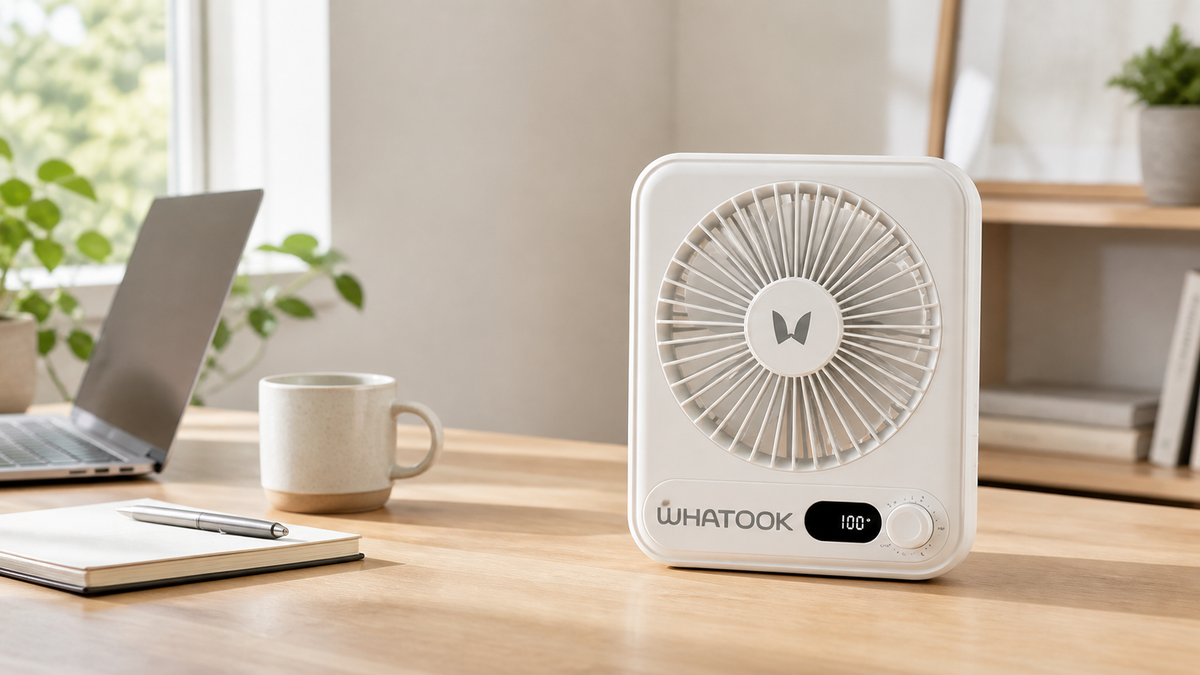
How to Choose a Quiet Desk Fan for Your Office
Some offices are freezing. Others feel like the AC gave up before lunch. And if you work from home, the warmest spot in the house somehow always seems to be right around your desk.
That’s where a quiet desk fan for office use can make a real difference. It gives you personal airflow without lowering the temperature for everyone else, taking up half your desk, or sounding like a tiny helicopter during a Zoom call.
The right fan isn’t necessarily the biggest or most powerful one. It’s the one that fits naturally into the way you work.
Compare WHATOOK desk fan controls and fit
Use the specifications below to narrow your choice, then check the current product page for colors, availability and price. These details describe the listed controls and dimensions; they are not a measured noise comparison.
HL008 rechargeable desk fan
A 0–100 control dial, digital display and up to 180° head tilt let you adjust and aim the breeze. The listed dimensions are approximately 164 × 134 × 39 mm.
Compare the 2000mAh and 5000mAh versions on the product page. Runtime depends on the version, selected speed and use conditions.
CF03 variable-speed desk fan
The CF03 has a 1–100 control dial and digital display. At approximately 180 × 43 × 220 mm, its listed height and footprint give you a different fit beside a keyboard or monitor.
Measure the space on your desk and compare the current product details before choosing.
For more on the controls, read how 0–100 fan speed settings work. To compare the full range, browse WHATOOK desk and table fans.
Start With Noise—But Don’t Get Distracted by the Word “Silent”
Let’s get one thing out of the way: every fan makes some sound. When a product is advertised as completely silent, it’s worth taking that claim with a grain of salt.
What you really want is steady, low-distraction sound.
For an office desk fan, pay attention to how the fan behaves at its lower settings. That’s where you’ll probably use it during meetings, phone calls, or focused work. A gentle, consistent hum tends to fade into the background much more easily than rattling, clicking, or constantly changing motor noise.
If a manufacturer provides a decibel rating, use it as a comparison point—but remember that the sound you experience can also depend on the fan’s speed, distance, and placement. A fan sitting two feet away usually doesn’t need to run at full blast.
Look for Airflow You Can Actually Control
More power sounds better on paper, but office cooling is mostly about control.
You may want stronger airflow after walking in from outside, then a softer breeze while answering emails. A desk fan with several speed settings—or more precise variable-speed control—makes it easier to stay comfortable without sending papers flying across your workspace.
Adjustable airflow direction matters too. Instead of pointing the fan directly at your face all day, aim it slightly across your upper body or toward the space around you. This creates a more comfortable cooling effect and can help prevent the dry-eye feeling people sometimes get from constant direct airflow.
If you share an office, an oscillating desk fan can provide wider coverage. For a private desk or cubicle, focused airflow may be the better choice.
Make Sure It Fits Your Desk
Desk space is expensive real estate.
Between a laptop, monitor, keyboard, charger, coffee mug, and the notebook you swear you’re going to use, there usually isn’t much room left. A small desk fan should provide useful airflow without becoming the main feature of your workspace.
Before choosing one, think about:
- The size of the fan’s base
- Where the charging cable connects
- Whether the controls are easy to reach
- Whether the fan can tilt toward you
- Whether it stays stable when adjusted
- How close it needs to be to feel effective
A compact desk fan is especially useful in home offices, dorm rooms, reception areas, and smaller workstations. A clean, simple design also tends to blend into the room instead of making the desk look more cluttered.
Rechargeable or Plug-In?
A plug-in fan works well if it will stay in the same place every day. But a rechargeable desk fan gives you more flexibility.
You can move it from your office to the kitchen, bedroom, or patio without hunting for another outlet. It’s also useful when your desk is already crowded with charging cables.
When comparing rechargeable fans, look beyond the battery capacity printed on the box. Runtime depends heavily on the speed setting. A fan may run much longer on low speed than it does at maximum power.
USB-C charging is convenient because it works with many of the cables and adapters people already carry. Still, always check the recommended charging input before using a different adapter.
Think About Your Actual Workday
The best office fan is the one that works with your routine.
For a Home Office
Choose a compact rechargeable desk fan that can move easily between rooms. Multiple speed settings are helpful if your workspace warms up throughout the day.
For a Shared Office
Prioritize low-distraction operation, stable placement, and adjustable airflow. You want personal cooling without bothering the person sitting next to you.
For Video Calls
Place the fan slightly off to the side and use a lower setting. This helps keep airflow away from the microphone while still making your desk more comfortable.
For Studying or Reading
A small fan with simple controls is often enough. Soft, steady airflow can make a warm study corner much easier to use for longer periods.
Small Details Make a Big Difference
Some fan features sound minor until you use them every day.
Easy-to-clean grilles help prevent dust buildup. A battery display makes it easier to know when the fan needs charging. A stable adjustment mechanism keeps the fan from slowly tilting away from you. Physical controls can also be easier to use than touch controls when you’re working without looking down.
None of these features are exciting by themselves. Together, they determine whether a fan becomes part of your daily setup or ends up forgotten in a drawer.
What About a Fan for the Bedroom?
Many of the same qualities that make a fan work well at a desk also make it useful beside the bed.
A small fan for bedroom use should have gentle lower speeds, simple nighttime controls, and a stable base. Rechargeable operation can make placement easier when the nearest outlet is already being used by a lamp or phone charger.
Just remember that a personal desk fan is designed for close-range comfort. It isn’t meant to cool an entire bedroom the way a full-size room fan or air conditioner would.
Finding the Right WHATOOK Desk Fan
WHATOOK is building its desk fan collection around personal cooling for real spaces: home offices, study corners, bedside tables, and everyday workstations.
When comparing models, start with the way you plan to use the fan. Consider the available desk space, the amount of airflow control you want, and whether you need rechargeable portability or wider oscillation.
You can explore the latest WHATOOK rechargeable desk fans. For two different desk setups, compare the HL008 Variable-Speed Desk Fan and the CF03 Round Desk Fan, then check each model’s current features, charging options, and availability.
Frequently Asked Questions
Is a desk fan good for an office?
Yes. A desk fan provides focused personal airflow without changing the temperature for the entire room. It can be particularly useful in shared offices where people have different comfort preferences.
How quiet should an office desk fan be?
There isn’t one perfect number for every workspace. Look for published sound information when available and compare how the fan performs at low and medium settings. Steady sound is generally less distracting than rattling or irregular motor noise.
Where should I place a fan on my desk?
Place it on a stable surface where the airflow can reach your upper body without blowing directly into your eyes or microphone. Keeping some distance between you and the fan can make the airflow feel softer and more natural.
Are rechargeable desk fans worth it?
A rechargeable fan is worth considering if you move between rooms, work away from an outlet, or want fewer cables on your desk. For a permanent workstation, either rechargeable or plug-in operation can work well.
The Bottom Line
A quiet desk fan for office use doesn’t need to be complicated. It should fit your workspace, give you enough control, and keep the background noise low enough that you can focus on what you’re doing.
Choose the fan that works at your normal desk—not the one that simply has the biggest number on the box.
Because the best kind of personal cooling is the kind you barely have to think about.

